
Generating Listings From Photos: eBay AI vs MyListerHub AI
Real-world test of eBay’s photo-to-draft AI vs MyListerHub’s photo-to-listing AI using a diamond engagement ring set and a Ford arm assembly. See where drafts break, what MyListerHub auto-fills, and what still needs review.

Updated Jan 2, 2026
|David Green
Generating Listings From Photos: eBay AI vs. MyListerHub AI (Speed, Accuracy, Less Manual Work)
Most sellers do not have a “speed problem.” They have a speed-without-mistakes problem.
Publishing fast is easy. The real problem is publishing fast without creating mistakes that come back as returns, INAD claims, and buyer frustration, or listings that don’t surface in search.
That’s why a lot of sellers tried the VA route first. On paper it sounds perfect: outsource listing, publish more, get your time back. In reality, the bottleneck just moves. You either fix the listings yourself, or you spend your day writing notes about what to fix.
So we tested what sellers actually want AI to do: turn your photos into publish-ready listings, without guessing.
In this case study, we compare:
- eBay’s photo-to-draft workflow (marketed as “Magical AI” in eBay’s own messaging)
- MyListerHub’s photo-to-listing workflow (our AI inside MyListerHub, built to use image analysis plus your store context, with strict confidence rules)
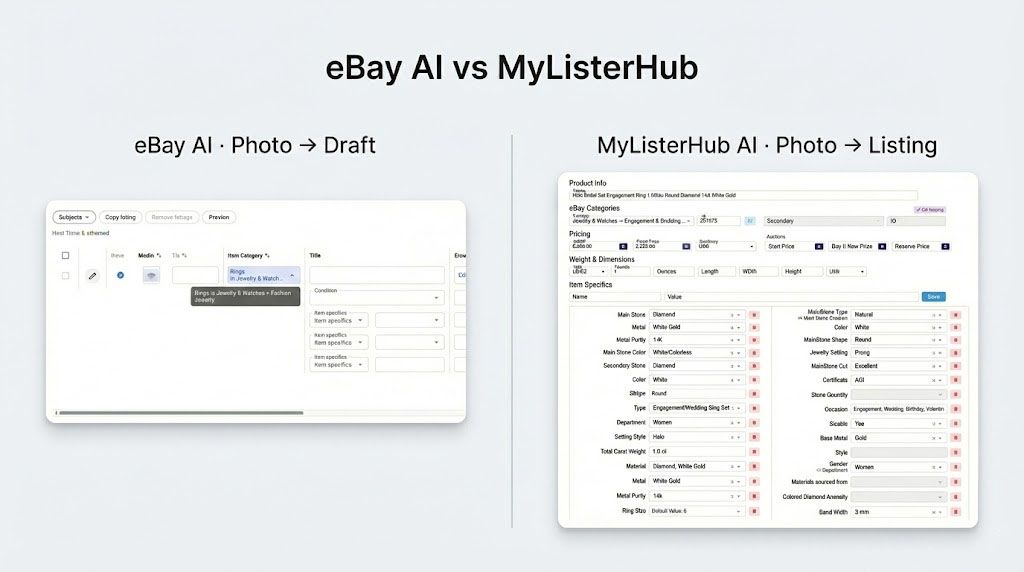
Quick, dry details on both AIs (for the technical-curious):
eBay’s Photo-to-Draft AI is a seller workflow that generates draft listings from uploaded photos, but still expects the seller to complete missing fields before publishing. eBay has published that it develops in-house e-commerce LLMs (LiLiuM) and also uses customized Llama-based models for parts of its AI experiences, but eBay does not publicly specify which exact model powers the bulk photo-to-draft interface. eBay’s official engineering write-up
MyListerHub’s Photo-to-Listing AI (Cavio AI) is our in-house system designed to produce publish-ready structured output. It analyzes the photos first, then uses inventory context, saved defaults, and user adjustments to reduce mistakes, and it only auto-fills fields when it meets a strict confidence threshold. If it’s not certain, it leaves the field blank.
What we tested (and why these two items)
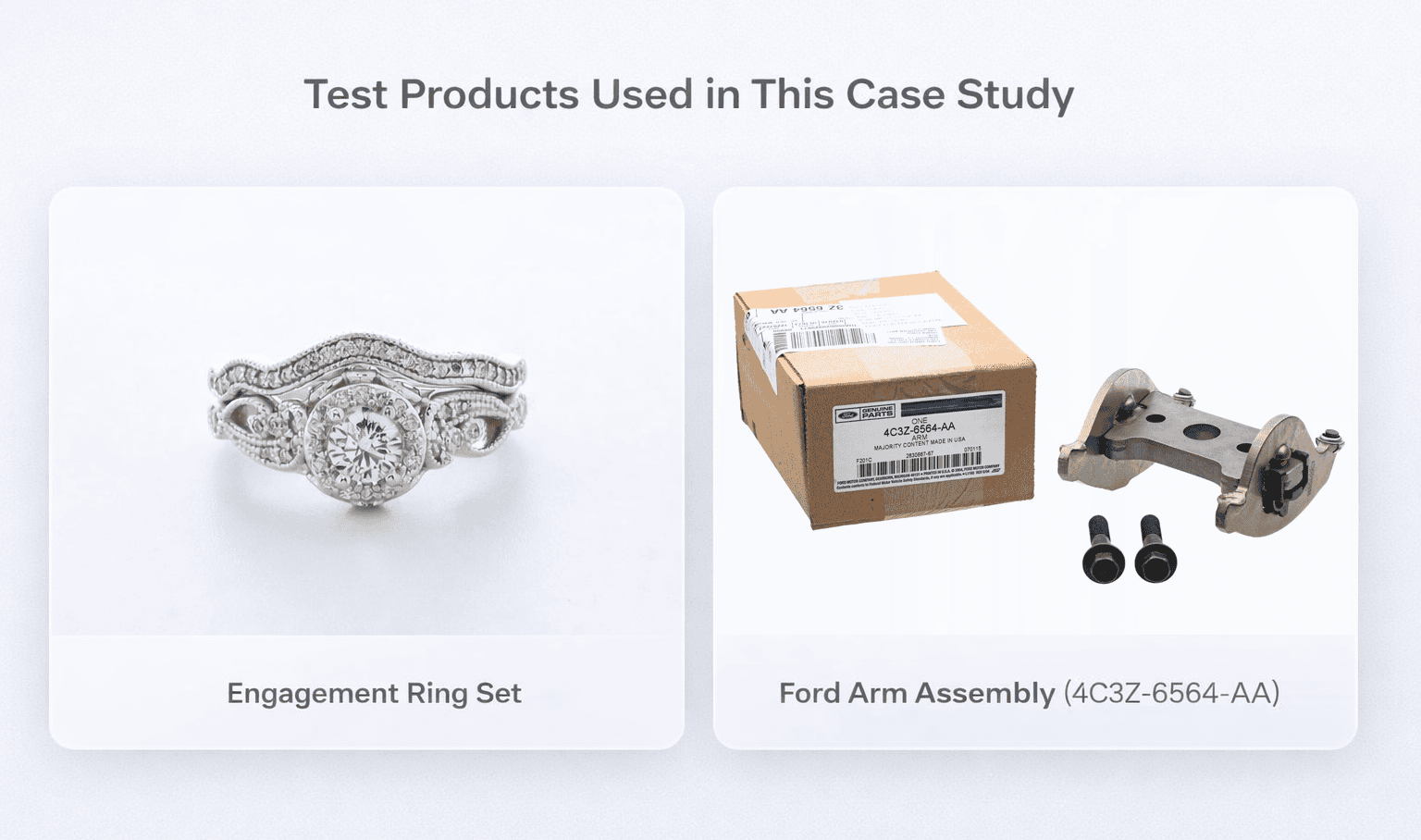
We ran the same experiment in both tools using two products:
- Diamond engagement ring set (ring + matching band, photographed together)
- Ford arm assembly (4C3Z-6564-AA) with two mounting bolts
We started with jewelry and auto parts because they’re two of the most common eBay categories where mistakes are expensive:
- In jewelry, wrong attributes hurt search visibility and buyer confidence.
- In auto parts, wrong attributes create returns, angry messages, and negative feedback fast.
We’ll keep running this same test across more categories, but this article focuses only on these two.
If you want the full Cavio workflow and what it generates beyond this case study, start here: Cavio AI: The smarter, faster way to generate and optimize eBay listings
The two AI approaches behind the workflows
eBay: generates drafts, then the seller finishes the work
In our tests (and in a seller-recorded walkthrough we reviewed), eBay’s workflow repeatedly produced unfinished drafts: missing key fields, inconsistent category behavior, and a lot of manual cleanup before publishing.
What matters operationally:
- The workflow is draft-first
- The seller is still responsible for making it publishable
MyListerHub: targets publish-ready structure with guardrails
Our workflow is built around a different goal: structured output that is reviewable quickly.
Inside MyListerHub, our AI does this in order:
- Analyzes the image first (product type cues, set detection, visible attributes, included items)
- Captures readable text from labels, tags, certificates when present
- Checks your store history and saved defaults to reduce wrong assumptions
- Only pre-fills when we’re 100% sure. If not, we leave it blank
- Auto-populates the default listing setup (shipping, returns, format, etc.) from your saved settings so you don’t re-enter them per listing
This is the core difference: eBay gives you drafts. MyListerHub tries to give you something you can review and publish.
A real workflow problem: photo count per product
One of the biggest operational blocks we saw:
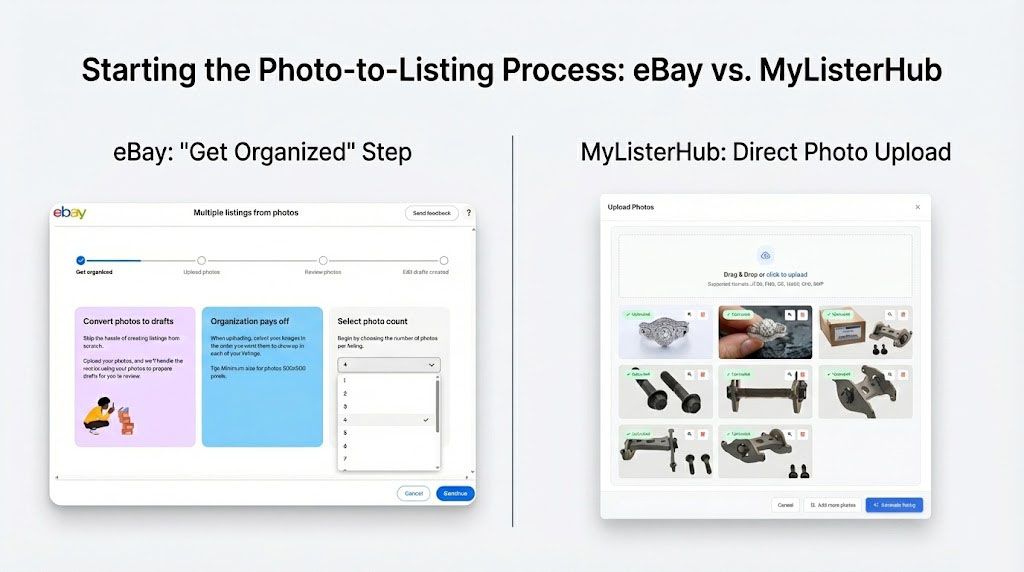
eBay makes you choose how many photos you’re uploading per product in a batch.
That sounds small until you list for real:
- One item has 3 photos
- Another has 8
- Another has 12
Real sellers do not shoot an even number of photos per SKU. When the workflow forces uniformity, sellers either re-shoot, re-organize folders, or batch incorrectly and clean it up later.
MyListerHub does not require a fixed photo count. Add as many photos as you want per item. No artificial limitation.
eBay Photo-to-Draft vs. MyListerHub Photo-to-Listing: 5 Real Differences That Matter
Below are the five biggest breakpoints we saw in eBay’s photo-to-draft workflow, using the same two products:
- Diamond engagement ring set (ring + matching band)
- Ford arm assembly (4C3Z-6564-AA) with two mounting bolts
We’re keeping the format simple: what eBay produced, what MyListerHub produced, and why it matters. We’ll keep running this same test across more categories, but this article focuses only on these two.
1) Category: missing, wrong, or misleading
What eBay did
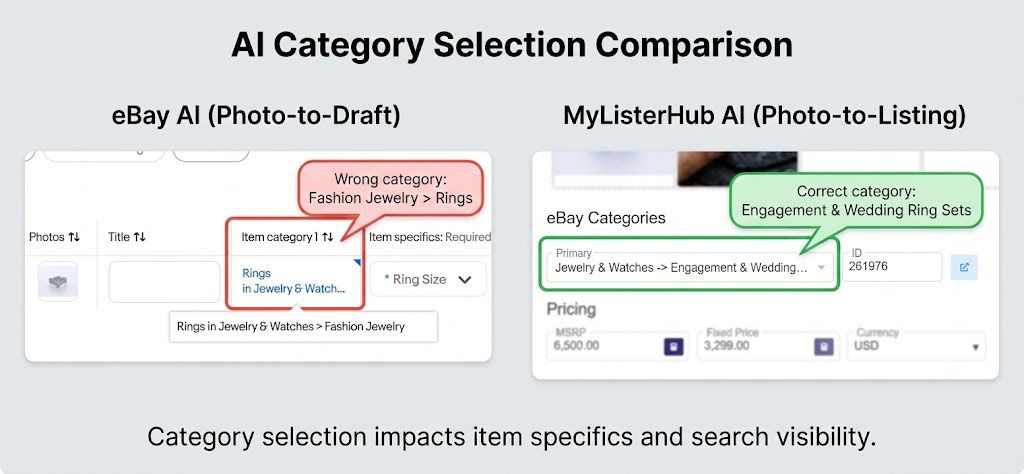
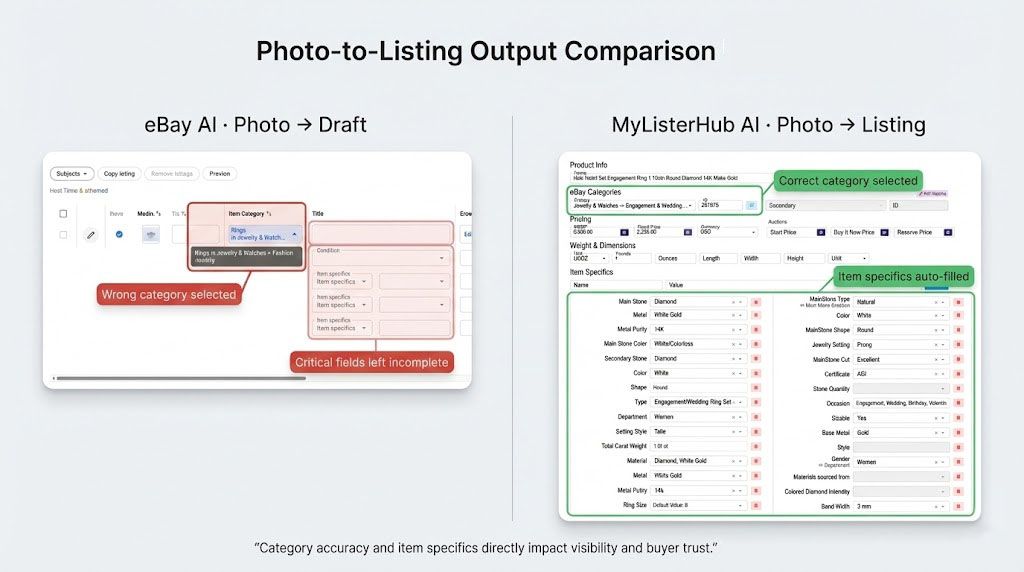
- Ring: eBay pushed it into a Fashion Jewelry path. That’s simply the wrong category for an engagement ring set, and it triggers the wrong item specifics schema.
- Auto part: eBay left the category blank, which forces the seller to do the most fragile step manually. One wrong click and you inherit the wrong required item specifics, and the listing won’t surface for the right searches.
Why this matters
Category is not just a folder. On eBay it controls:
- which item specifics appear as required
- what search filters buyers use to find you
- what eBay considers “relevant” for that listing
The fastest way to bury a listing is to start in the wrong category and then fill out the wrong item specifics.
How MyListerHub handled it
MyListerHub selects category using image signals + inventory patterns + your listing history, then adds a sanity check most sellers wish eBay gave them:
It can show what active listings look like inside that category, so you can instantly confirm your product belongs there instead of guessing.
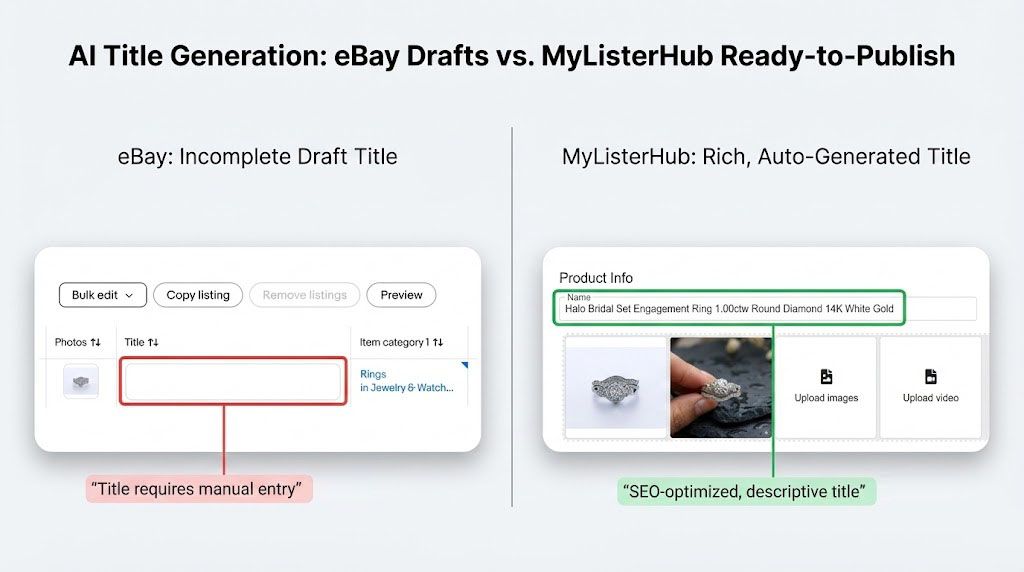
2) Title: left to the seller, even though it carries the most weight
What eBay did
- Ring: title was left blank in the grid. No suggestions, no structure, no correction.
- Auto part: same story. Even with a visible part number on the box label, eBay still left the title work for the seller.
Why this matters
After photos, title is the most important “found in search” field you control.
If you want a mental model: picture a scale with Title on one side and item specifics, description, condition, and price on the other (not including photos). Title determines whether the right buyer finds your listing and clicks.
When title is left empty, sellers lose twice:
- the workflow stops being “AI listing” and becomes manual again
- sellers tend to write titles that bury the most important identifiers too late (part number, metal purity, ring set, etc.)
How MyListerHub handled it
MyListerHub generates keyword-rich titles built for search behavior, with a consistent structure:
- Front-load the primary identifier in the first 3–5 words (brand, model, part number, core attribute)
- Add buyer filters next (material, size, condition, what’s included)
- Keep it readable, not spammy
So the title becomes the first thing that helps search instead of the first thing you have to fix.
3) Condition note: left empty, even though it prevents returns and disputes
What eBay did
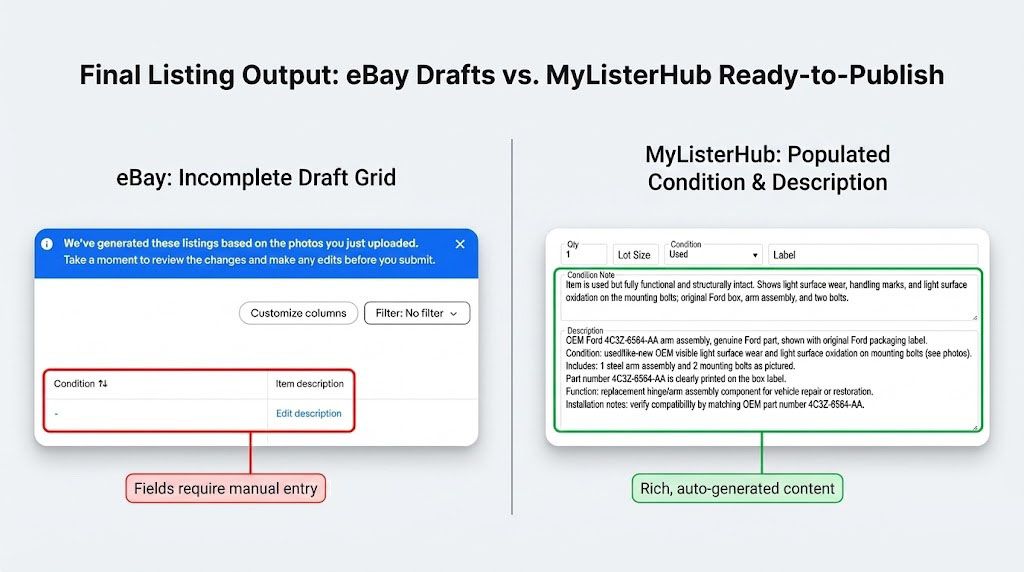
- eBay commonly left Condition note empty, even when condition context clearly matters (especially for used parts and high-value jewelry).
Why this matters
Condition note is one of the most underused “profit protectors” in a listing. A good condition note reduces:
- returns, INAD claims, buyer frustration, and listings that don’t surface in search
It sets expectations before the buyer clicks Buy It Now.
How MyListerHub handled it
MyListerHub generated condition notes with real detail by using visual cues. Our image analysis is built to identify:
- scratches, dents, marks, blemishes
- with box vs no box, open box cues
- packaging condition signals
- included accessories visibility
Example from your tests:
- Ford arm assembly: it recognized the listing includes two bolts and included that in the condition narrative and “items included.”
- Ring set: it recognized this is a set (ring + matching band) even though they’re photographed together.
4) Description: empty first, then rewritten generically
What eBay did
eBay left description empty, and allowed just to rewrite their the AI.
That creates two problems:
- Sellers are forced into manual writing of the description, which defeats the point.
- Their AI rewrote the seller description in a very generic way.
Why this matters
If sellers have to write the description anyway, “photo-to-draft” becomes “photo-to-more-work.”
And generic text is not neutral. It creates extra buyer questions, and those questions turn into messages, delays, and sometimes missed sales.
How MyListerHub handled it
MyListerHub generated a structured, category-aware description that pulled in what the images and labels actually prove:
- what the item is
- what’s included
- visible condition cues
- any text captured from tags, labels, certificates (when present)
You also called out an important differentiator:
MyListerHub captures readable text from labels, tags, and certificates and places that information into the description and item specifics so it isn’t lost.
5) Default fields: after you do the work, you still have to do more work
What eBay did
Once you are done filling in all the item specifics, pricing, and description, you need to fill in all the default fields like shipping, return, format, etc.
Why this matters
This is where sellers feel the “AI tax.” Even after you fix what the AI didn’t do, you still can’t publish without completing the operational fields. That slows down throughput and increases inconsistency across listings.
How MyListerHub handled it
MyListerHub pulls shipping and return policies from your saved settings and auto-populates them, so you are not re-entering policies per listing. Same idea for other stable defaults you already set in your business.
If you’re not listing at volume yet, this guide will give you the foundation before you jump into AI workflows: New to eBay automation? Start with this guide first.
What MyListerHub filled from the image (not inventory guessing)
This is the part that gets missed when people talk about “inventory context.” Inventory context helps with safe defaults, but it only kicks in after image analysis.
From the engagement ring photos:
- Type: Engagement/Wedding Ring Set
- Main Stone Shape: Round
- Department: Women
- Setting Style: Halo
- Total Carat Weight: 1.00 ct
- Color: White
- Main Stone Color: White/Colorless
It also picked up style signals visible in the photos (halo look, pavé accents, milgrain-style detailing cues), and used those to generate a description that reads like a real listing, not filler.
From the auto part photos:
- We captured the part number from the box label: 4C3Z-6564-AA
- We recognized the Ford Genuine Parts packaging cue
- We counted two mounting bolts in the photo and included them as “items included”
- We populated:
- Manufacturer part number
- OE/OEM part number
- Included items (arm assembly + 2 bolts)
- A condition narrative consistent with visible wear and packaging cues
We also injected the part number into the description so it’s immediately visible to the buyer.
That’s the practical difference between “AI that drafts” and “AI that turns your photos into publish-ready listings, without guessing.”
What MyListerHub produced using inventory context
After image analysis, we use store context to reduce wrong assumptions and manual work, but only when confidence is absolute.
Jewelry seller examples (safe defaults + high-confidence patterns)
If the seller has stable defaults (ring size preset, quantity preset, packaging preset, consistent occasions), we can auto-fill those without guessing.
If the inventory strongly supports a field and the image supports it as well (e.g., metal purity patterns + visible metal color cues), we’ll fill it. If not, it stays blank.
And we purposely left some fields blank in your test (like stone color/clarity) because the seller carries many valid options, and the photo can’t prove them.
Auto parts seller examples (category constraint that prevents common mistakes)
Because this seller’s store is entirely auto parts, our system didn’t treat the item like a generic “vehicle part” that could drift into ATV or Business & Industrial. We constrained category selection toward the Cars & Trucks path, where the seller’s inventory history proves the item belongs, which avoids one of the most common seller mistakes (and one of the most common ways platforms mis-suggest categories).
Important: we do not “guess to fill everything.” If it’s not certain, it stays blank.
What MyListerHub correctly left blank
We left stone color and clarity blank because the seller carries many valid options and the image alone cannot prove those details.
That is not a weakness. It’s a guardrail.
Want to see this on your inventory?
If you want to see how MyListerHub uses your store history to reduce wrong assumptions and manual work, book a demo, and we’ll run it live on real products from your store. You’ll see exactly what gets filled, what stays blank, and how fast review-to-publish can be when the defaults are already handled.
Popular articles


ALL-IN-ONE
SHOULD REALLY MEAN
ALL-IN-ONE!
Orders, Offers, Messages, Chat, SMS, Listings, Inventory, AI, Automation, Syncing, Shipping, Customization, Analytics, Bookkeeping & Accounting, Template Designer, CRM, and a lot more.